前端開發
JavaScript 動態載入:import() 與 Vue 非同步元件
整理靜態 import、動態 import() 與 Vue defineAsyncComponent 的使用方式,並簡單補充 Vite import.meta.glob 的用途。
W
- 一般
import會在模組載入時建立依賴;import()則可以等到真的需要功能時再載入。 - 打包工具通常也會利用動態載入進行 code splitting,把較大的功能拆成獨立 chunk。
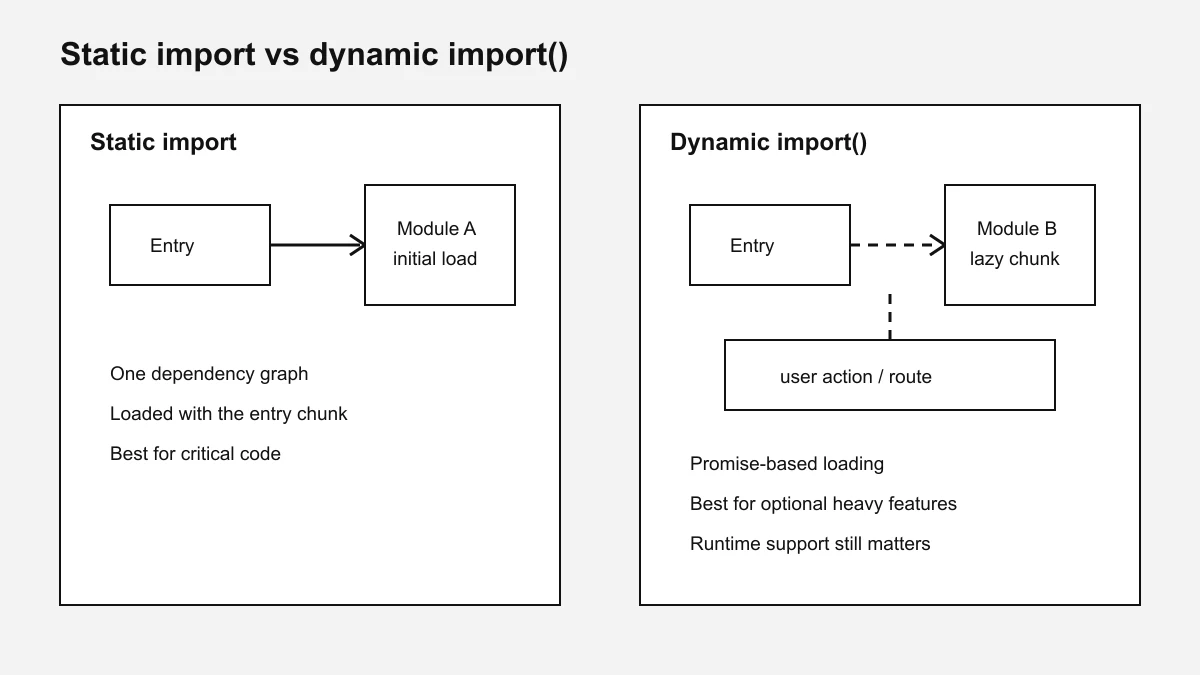
靜態 import
一般最常使用的是靜態 import:
import { formatReport } from './report'

formatReport(data)
適合:
- 頁面一定會使用的功能
- 體積不大的模組
- 元件初始化時就需要的程式碼
如果沒有特別需要延後載入,使用一般 import 就可以。
動態 import()
import() 會回傳 Promise,可以等到需要時再載入:
async function exportReport() {
  const { formatReport } = await import('./report')

  return formatReport(data)
}
比較適合:
- 大型圖表
- 編輯器
- 匯出功能
- 只有部分使用者會使用的功能
例如使用者按下「匯出」之後,才載入相關套件,就不用把這些程式碼全部放進初始 bundle。
路徑最好讓打包工具可以在 build 時分析:
await import('./report')
不要依賴完全由執行期字串拼出的路徑,否則打包工具可能無法判斷要把哪些檔案放進產物。
Vue 3 非同步元件
Vue 可以搭配 defineAsyncComponent() 延後載入元件:
<script setup lang="ts">
import { defineAsyncComponent } from 'vue'

const HeavyEditor = defineAsyncComponent(
  () => import('./HeavyEditor.vue')
)
</script>

<template>
  <HeavyEditor v-if="isEditing" />
</template>
這種方式適合只在特定情況下才會顯示的元件。
例如:
開啟編輯器
打開大型圖表
開啟報表
進入特定功能頁
如果是首屏一定會顯示的核心元件,就沒有必要全部改成非同步載入。
補充:Vite 的 import.meta.glob
如果需要一次取得某個資料夾裡的一批模組,Vite 另外提供:
const modules = import.meta.glob('./widgets/*.vue')
假設資料夾是:
widgets/
├── chart.vue
├── map.vue
└── table.vue
Vite 會建立類似這樣的對照:
{
  './widgets/chart.vue': () => import('./widgets/chart.vue'),
  './widgets/map.vue': () => import('./widgets/map.vue'),
  './widgets/table.vue': () => import('./widgets/table.vue')
}
需要某個模組時再載入:
const module =
  await modules['./widgets/chart.vue']?.()
預設是 lazy loading。
如果希望全部直接載入,可以使用:
const modules = import.meta.glob(
  './widgets/*.vue',
  { eager: true }
)
可以簡單理解成:
import.meta.glob(...)
→ 找出一批符合條件的檔案
→ 需要時才載入

import.meta.glob(..., { eager: true })
→ 找出一批符合條件的檔案
→ 一開始全部載入
import.meta.glob() 是 Vite 提供的功能,不是 JavaScript 原生 API。
一般 Vue / Nuxt 專案不一定會用到,只有需要批次取得一組檔案時才比較方便。
怎麼選
| 情況 | 建議 |
|---|---|
| 一開始就會使用 | 靜態 import |
| 使用者操作後才需要 | import() |
| Vue 大型元件延後載入 | defineAsyncComponent() |
| Vite 批次取得一組檔案 | import.meta.glob() |
小結
一般情況先使用:
import something from './something'
只有確定某個功能不需要一開始載入時,再考慮:
const module = await import('./something')
Vue 元件則可以使用:
defineAsyncComponent(
  () => import('./HeavyComponent.vue')
)
至於 import.meta.glob(),把它當成 Vite 提供的批次 import 工具就可以,不需要每個專案都使用。